This Apple iPad Quick Reference Guide is invaluable for those who are eager to learn to navigate their iPad! Check it out!

Showing posts with label guide. Show all posts
Showing posts with label guide. Show all posts
Thursday, September 19, 2013
Friday, September 6, 2013
Gmail Tip: Signing out of all Sessions
 | |||
| I'm not sure if I signed out from that other computer on campus! Help! |
But what if you have been on more than one computer and one of them was in a public location like on campus or in a library? What if you closed the browser but later realized you forgot to sign out of Gmail or other Google accounts?
To sign out of all sessions go to any computer with an internet connection and do the following:
1. Open your Gmail account and click on the Details link at the bottom of your screen.
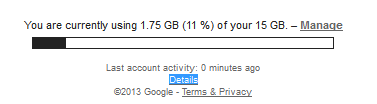
2. Choose to Sign out of all other sessions (it will leave you logged in your Google account on the current computer only).

Wednesday, August 7, 2013

Thursday, June 27, 2013
Outlook to Gmail
 |
| I want to move/copy my email folders (with the emails intact) from Outlook to Gmail. How do I do that with the least amount of pain? |
This question was posed to me by a faculty member recently. I did a bit of research and came up with a pretty easy fix for this. Here's the link to the instructions: http://www.cte.hawaii.edu/Googly/Outlookfolders2Gmail.pdf. If you have problems working through the process, please call the UH Manoa ITS Helpdesk and they will walk you through it. Phone: (808) 956-8883 Toll Free (neighbor isles): (800) 558-2669
Subscribe to:
Posts (Atom)