Showing posts with label tools. Show all posts

Wednesday, August 27, 2014

New **Google Slides for iPad & iPhone**

Google Introduces Slides for iOS!
Create, edit, and collaborate with others on presentations from your iPod, iPhone, or iPad with the free Google Slides app. With Google Slides you can:

* Create new presentations or edit any that were created on the web or on another device 

* Share presentations and work together with others in the same presentation at the same time

* Open, edit, and save Microsoft PowerPoint files* Get stuff done anytime -- even without an internet connection* Add and rearrange slides, format text and shapes, and more

* Present right from your device* Never worry about losing your work -- everything is automatically saved as you type


FREE in the APP Store


Thursday, November 21, 2013

Print your Google Calendar!

Print or create a PDF of your Google Calendar!
Something new to me - the ability to print out or save various views of my Google calendar or agenda!

Here's how:

1. Go to the calendar you want to print or save
2. Click on MORE and Print
3. You will automatically be in Print Preview and you can make adjustments as needed
4. If you'd like to convert your view to a PDF, click on Save As

*Note: I needed to expand the window to full size in Chrome to see the Save As option on the bottom right corner

I love being able to print out specific calendars and agenda in Google! Sometimes being able to hand a calendar page to a colleague, print out my personal calendar or having the ability to write notes on the week's work agenda is helpful!

Thursday, September 19, 2013

Apple iPad Quick Reference Guide

This Apple iPad Quick Reference Guide is invaluable for those who are eager to learn to navigate their iPad! Check it out!

iPad Screen Shots and Photo Sharing

How can I share a screenshot with my iPad?

It's surprising how many people don't realize how easy it is to take and share a screenshot with their iPad! Try it out!


Take a screenshot


Share your image
Press and release the Sleep/Wake button at the top right of your iPad and the Home button at the same time. You’ll see the screen ‘flash’ white and hear a camera ‘clicking’ sound. Now open the Photos app on your iPad. The screenshot is added to your Camera Roll album. Tap the thumbnail to view the screenshot. 


Tap the Share button (arrow) at the top left of your screen. A window will open up where to can choose email, Twitter, print, Facebook, etc. Tap the appropriate icon to share or post online.


Friday, September 6, 2013

Gmail Tip: Signing out of all Sessions

I'm not sure if I signed out from that other computer on campus! Help!


Normally, if you want to sign out of Gmail or Google Apps, it's just a matter of clicking on your email address in the top right of your screen and selecting Sign out.

But what if you have been on more than one computer and one of them was in a public location like on campus or in a library? What if you closed the browser but later realized you forgot to sign out of Gmail or other Google accounts? 


To sign out of all sessions go to any computer with an internet connection and do the following:

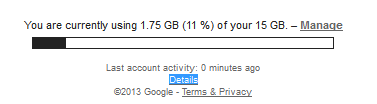
1. Open your Gmail account and click on the Details link at the bottom of your screen.

 
2. Choose to Sign out of all other sessions (it will leave you logged in your Google account on the current computer only).

Thursday, June 27, 2013

Welcome to edsquared!

edsquared
Aloha everyone!

As an Educational Specialist at the Center for Teaching Excellence, I'm excited about the introduction of this blog to our University of Hawai'i community. I have lots of great ideas to keep you up-to-date with technology in education, plus I'll be offering lots of Tips & Tricks, a little bit of advice, and a place for you to comment on topics, request help or assist others who may need some guidance. Your thoughts and ideas are encouraged! 

I look forward to presenting up-and-coming sessions and workshops on campus. You can check our calendar here. 


Please don't hesitate to email me if you'd like to see a particular topic addressed. Some of the topics I plan to cover will be Google Education, Gmail Tips & Tricks, Google Forms, Google Sites, Google Search, Google Docs (collaborative) Twitter, plagiarism, information literacy, copyright guidelines, and iPad related topics + much more!


suzy :)